Auto SR’s useful change is that a dock is no longer required on supported Xbox Ally handhelds. Microsoft announced on 10 November that Automatic Super Resolution is leaving preview on ROG Xbox Ally X and X20, alongside support for selected AMD-powered Copilot+ PCs. This is Windows-level upscaling, not a promise that every Ryzen computer receives the feature.
Available support and staged features
The announcement puts undocked battery operation, expanded AMD Copilot+ support and 1080p input support in the available group. Performance Mode and Auto HDR compatibility are rolling out through Windows updates. A missing mode on one device therefore does not establish that the announcement was false—or that reinstalling a game will make the rollout arrive sooner.
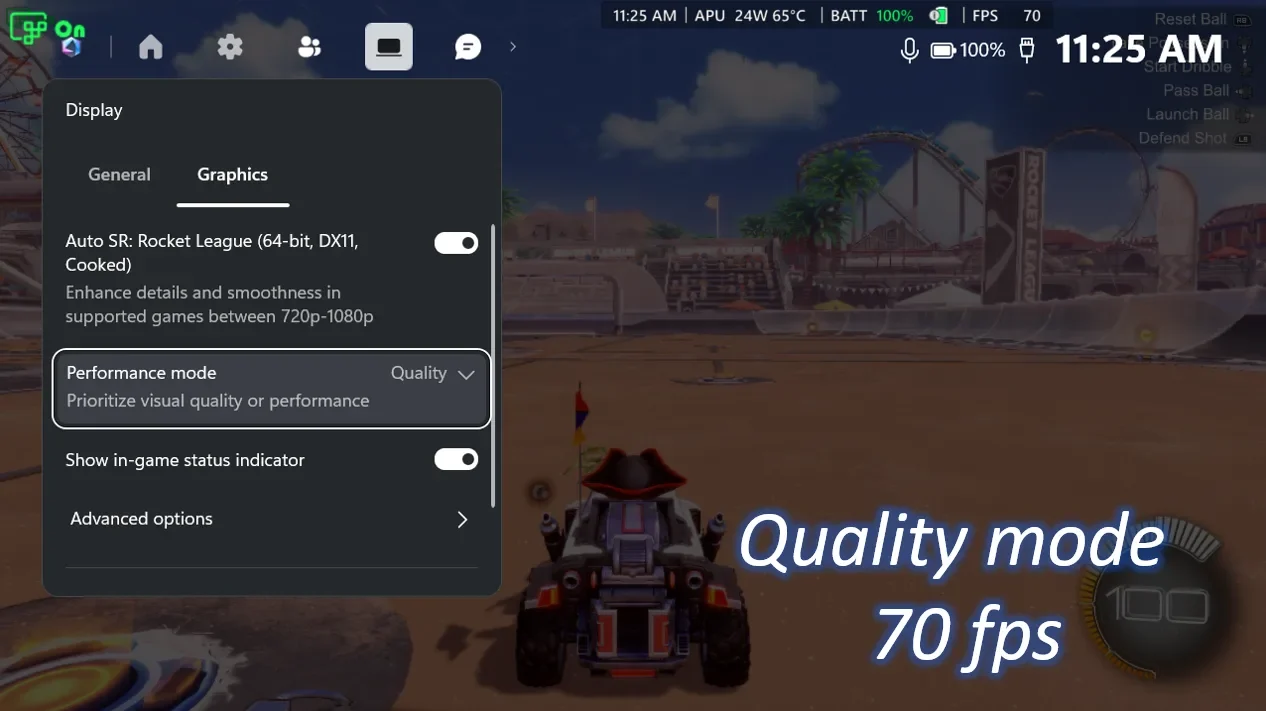
Microsoft describes Performance Mode as supporting up to 120 fps. That is a capability ceiling, not a guaranteed frame rate in your library. Its published Rocket League images are publisher demonstrations; we have not benchmarked the handhelds or measured battery life.
Check the full compatibility chain
Microsoft’s current support page requires a supported NPU-equipped device, fully updated Windows 11 24H2 or later, current graphics/NPU drivers and the correct Auto SR package. Its device list is more useful than a generic “Windows gaming PC” label. Check the exact model rather than assuming the base Ally and Ally X have identical requirements.
The support matrix lists DirectX 10 or newer games and excludes x86 games and DirectX 9, Vulkan and OpenGL runtimes. A game running well on the handheld does not, by itself, mean Auto SR can process it.
Verify the feature in the game
Update Windows and Game Bar, install the platform-appropriate package linked by Microsoft, then open Game Bar’s Display widget and its Graphics tab. Use the in-game status indicator to confirm operation. If it remains off, follow the displayed resolution or display-mode explanation rather than judging a screenshot by eye.
For ordinary graphics choices, see our PC settings guide. Auto SR, a game’s own upscaler and frame generation are separate controls; avoid treating every technology’s compatibility list as interchangeable.