AMD Adrenalin 26.10.2: which Radeon crashes it fixes, and who should update
AMD's 30 October optional Radeon driver addresses game crashes and overlays, but known Cyberpunk, War Thunder and Phantom Blade Zero problems remain. Read the hardware-specific guide before installing.
Last checked 1 November 2026, Queensland: AMD released Adrenalin Edition 26.10.2 on 30 October as an optional driver for compatible Radeon products. It lists fixes for selected game crashes, driver timeouts, display/overlay behaviour and installer issues. It is not a new graphics-card launch, not a measured universal FPS boost and not automatically necessary for every PC gamer.
The most useful question is whether an issue in AMD's actual release notes matches your GPU and what is happening in your games. AMD lists 26.10.1 as a separate Recommended package on some support pages; a newer optional version can be useful for a particular bug without becoming the default best choice for everyone.
What 26.10.2 specifically says it fixes
| Game / issue | Affected hardware in AMD's notice | Fix description |
|---|---|---|
| Valor Mortis | Radeon RX 7600 / RX 7000 series | Addresses reported intermittent shutdowns on RX 7600 and driver timeouts on some RX 7000 cards. |
| Steam launcher | AMD Radeon products | Addresses a crash when launching the Steam client on affected systems. |
| Overlays and Xbox Game Bar | AMD Radeon products | Addresses crashes or timeouts when opening or closing overlays alongside Adrenalin's Performance Metrics overlay. |
| FSR Frame Generation / app switching | Radeon RX 9000 series | Addresses crash/hang scenarios when switching apps or toggling overlays in games with FSR Frame Generation. |
| Death Stranding 2 with AMD FSR | Radeon RX 9000 series | Addresses an intermittent hang described in the previous notes. |
| Windows 11 video playback with HAGS | Radeon RX 7000 series | Addresses an intermittent driver timeout during video playback when Hardware-Accelerated GPU Scheduling is enabled. |
AMD also lists fixes involving Final Fantasy Resonance on certain Ryzen AI MAX PRO processors, some Windows 10 RX 9000 configurations after use of AMD Cleanup Utility, and AMD Install Manager failing to locate optional releases. Not every fix applies to every Radeon user.
Important: problems AMD still lists as known issues
Known issue does not mean fixed. AMD continues to warn about crashes/timeouts with Assassin's Creed Black Flag Resynced on some RX 7000 cards and with War Thunder on RX 5000 cards. For the latter it recommends 26.9.1 to affected players, rather than automatically installing the latest optional driver.
On certain RX 9000 cards, Cyberpunk 2077 can still encounter crashes or timeouts when AMD FSR Upscaling, Anti-Lag and in-game frame generation are combined during video playback on a second display. AMD advises temporarily disabling in-game frame generation. AMD also notes Phantom Blade Zero sky and character-hair visual corruption on RX 9000, recommending users seeing the hair issue disable High-Quality Hair in game. Those are specific published mitigations—not generic advice to disable every graphical feature permanently.
Should you install it?
| Your situation | Reasonable next step |
|---|---|
| Everything works on a Recommended driver | Read the notes first; you can keep a stable driver rather than installing optional updates reflexively. |
| Your exact card and issue match a listed fix | 26.10.2 is worth evaluating from AMD's official download page after preserving your working settings. |
| You're affected by a listed known issue | Use AMD's specific mitigation or driver recommendation; newer is not guaranteed better. |
| You own an NVIDIA GeForce or Intel Arc GPU | This AMD Radeon graphics driver is not your graphics-card driver; use your GPU vendor's support page. |
| You're on an OEM laptop or handheld | Check the device maker's driver/support policy before replacing customised OEM graphics packages. |
How to check the version on your PC
- Open AMD Software: Adrenalin Edition from Start on a supported Radeon system.
- Search for System, open System Settings, then inspect the installed software and hardware/driver details.
- Use Manage Updates in AMD Install Manager. AMD's settings can offer Recommended by default or Recommended + Optional when selected.
- Compare your GPU against the 26.10.2 compatibility list and review both Fixed Issues and Known Issues before choosing.
- Before a driver change, save work and available graphics profiles, note the old version, and follow AMD's installation and restart instructions. Don't install unofficial repackaged driver executables.
Does this mean higher FPS in MW4, Cyberpunk or every game?
No new independent benchmark dataset is provided in this story. A fix for a crash or timeout does not establish a specific frame-rate improvement. 26.10.1 was the earlier release that documented support for Modern Warfare 4 and other new games; don't conflate that entry with an invented 26.10.2 performance table. Likewise, the known Cyberpunk 2077 second-display condition is not proof that every player will crash.
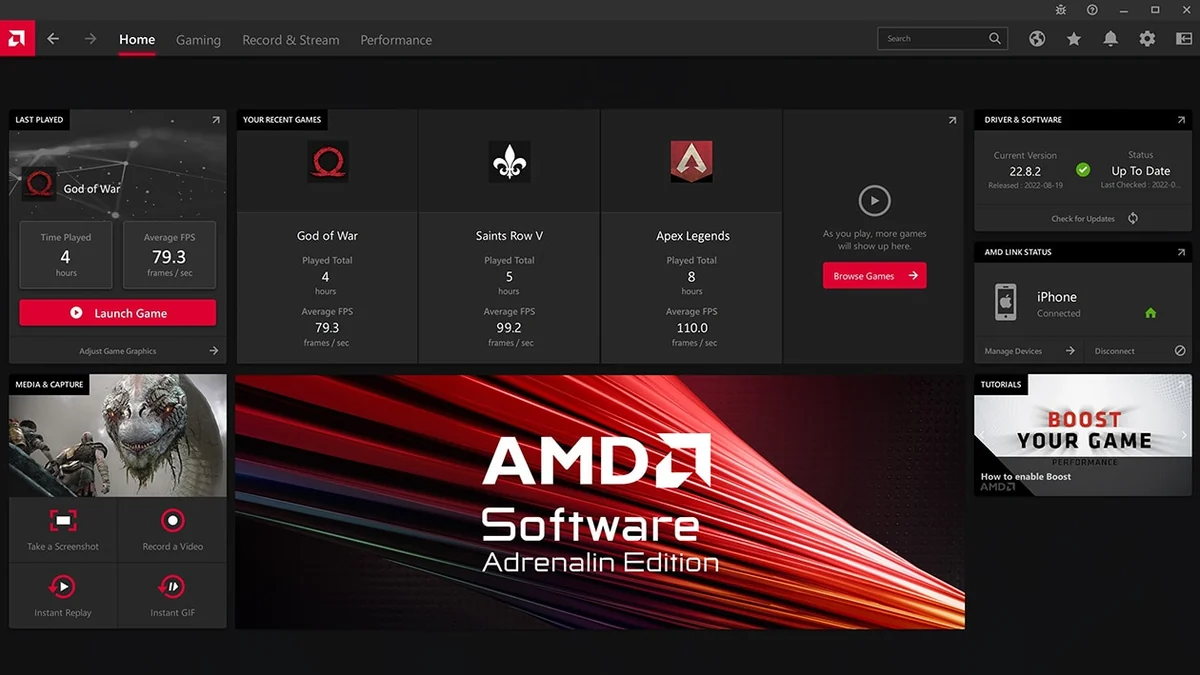
Image note: the AMD-published software screenshot illustrates an earlier interface version. It is not a capture of 26.10.2, current game FPS or an independent benchmark. For exact changes use the official 30 October 26.10.2 release notes, and for up-to-date steps consult AMD's 30 October driver-information guide.